What is Digital Health Locker?
Digital Health Locker is a secure cloud-based platform that allows users to upload, store and share all their medical documents digitally. It has been launched under the Ayushman Bharat Digital Mission (ABDM) to enable people to manage their health records online.
Health locker eliminates the need for carrying a hard copy of the medical documents, such as prescriptions, diagnostic test reports, etc. Instead, it allows people to instantly share their health documents with any medical professional across the country.
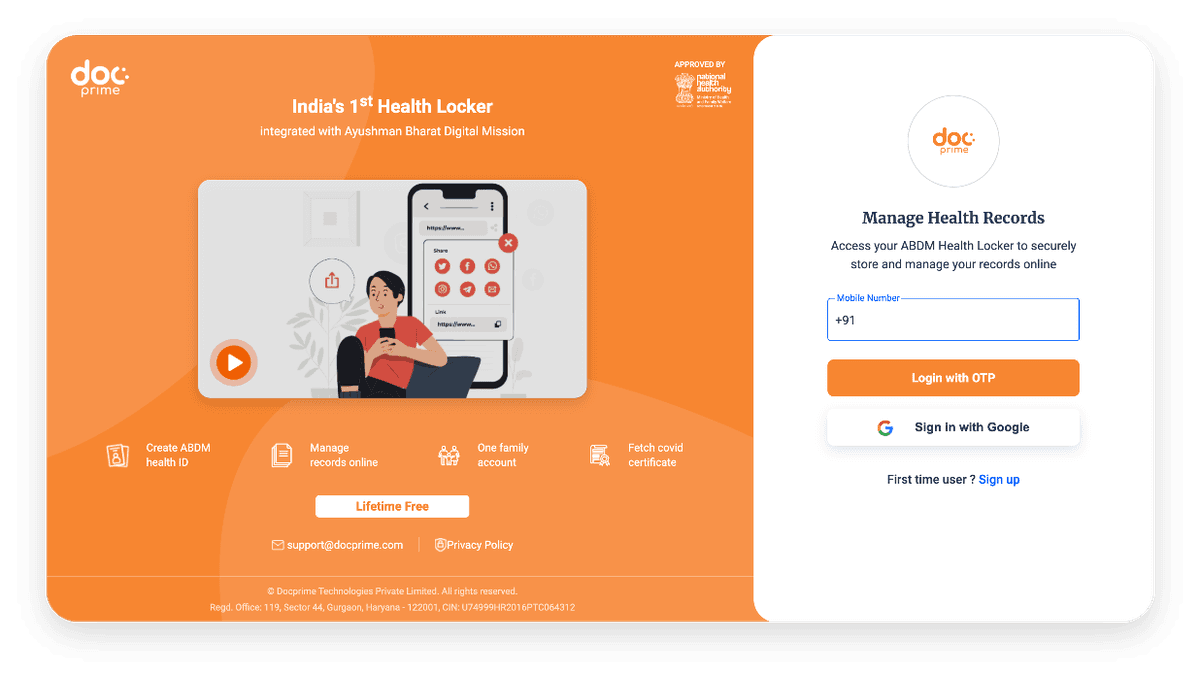
In a first, Docprime Technologies has launched a free Docprime Health Locker for its customers. Docprime Health Locker is the first health locker in India to be integrated with Ayushman Bharat Digital Mission.
Features of Digital Health Locker
Here are some of the unique features of a digital health locker:
Management of medical documents online
QR code-based process to share health records with hospitals/doctors
Lifetime access to free digital health locker
One locker for the entire family
Faster health diagnosis with instant sharing of medical documents
Automatic fetching of health documents from doctors/hospitals
Complete control of health records with utmost safety and security
Benefits of Digital Health Locker
Digital health locker comes with the following benefits:
- No Need for Bulky Folders
A health locker eliminates the need to carry bulky folders of medical documents.
- More Accessible
Access medical documents stored in a digital locker anytime anywhere.
- No Risk of Losing the Documents
Eliminates the risk of losing medical documents.
- One Locker for Entire Family
A single health locker can store medical documents of the entire family.
- Faster and Accurate Diagnosis
Enables faster and more accurate diagnosis even if the patient cannot recall past medical conditions.

How to Set Up Digital Health Locker on Docprime?
Follow the steps given below to set up a Docprime health locker:
- Visit the official website of Docprime Health Locker
- On the login page, enter the phone number or use a Google account to log in.
- First-time users can go to the 'Sign up' option
- Enter the requested personal details, such as name, date of birth, etc.
- Fill in the phone number and the OTP received on the phone
- Accept the terms and conditions and submit the details
- The Docprime Health Locker will be set up.